One photo of a guest.
A century of them.
Three AI photo ops you switch on for a single event: six decades of a guest from one selfie, portraits in the styles you write, and a booth that puts guests somewhere else entirely.
Dykema Automotive Legal Summit
AI Time Machine
One selfie. A century of you.
- 1Take one selfie
- 2Watch six eras appear
- 3Text or email them to yourself
Thursday, August 20
1:18
The iPad and phone screens are rebuilt in HTML from the app. The six portraits and the sheet are one guest’s, from the Dykema Automotive Legal Summit (Aug 20, 2026); this page runs no camera, so the viewfinder is a drawing and the guest’s number is a sample.
Where each one actually runs
Two of the three send a guest photo to Google to generate the images. The third never leaves the iPad. Guests are told which is which before the camera opens.
The guest’s selfie goes to Google to make the six portraits. The guest reads that line and taps “I agree — take my photo” before the camera opens.
Same consent card, same trip: one photo out, your styles back. You write the prompts; guests see the style names you gave them.
The cut-out is a model running on the iPad itself — about six tenths of a second per photo, and it keeps working with the venue Wi-Fi down.
Google is on our sub-processors list for these three tools, and for nothing else. Face data never goes there.
One selfie. A century of you.
The guest stands on a plain set and takes one photo. The kiosk comes back with six portraits of them — one per decade, each in that era’s clothes, car and street — and lays all six on a single sheet in your client’s colours. They watch the frames fill in while they wait, then text the sheet to themselves.
- One photo of the guest — the kiosk counts 3-2-1 so nobody is looking at the button
- Six decade portraits, each one beside a car, a set or a street from that era
- All six on one 8×12 sheet in the client’s colours, ready to print or text
- The guest picks “Text it to me” or “Email” at the kiosk — nothing sends itself
- A decade that does not come through is retried, then swapped for a spare — the guest still gets the rest
Mammoth ran it at Dykema’s Automotive Legal Summit at M1 Concourse on August 20, 2026: 47 guests, 61 six-decade sheets, and 366 decade portraits, six to a sheet — every one of them made, delivered and in the client’s gallery the same day.
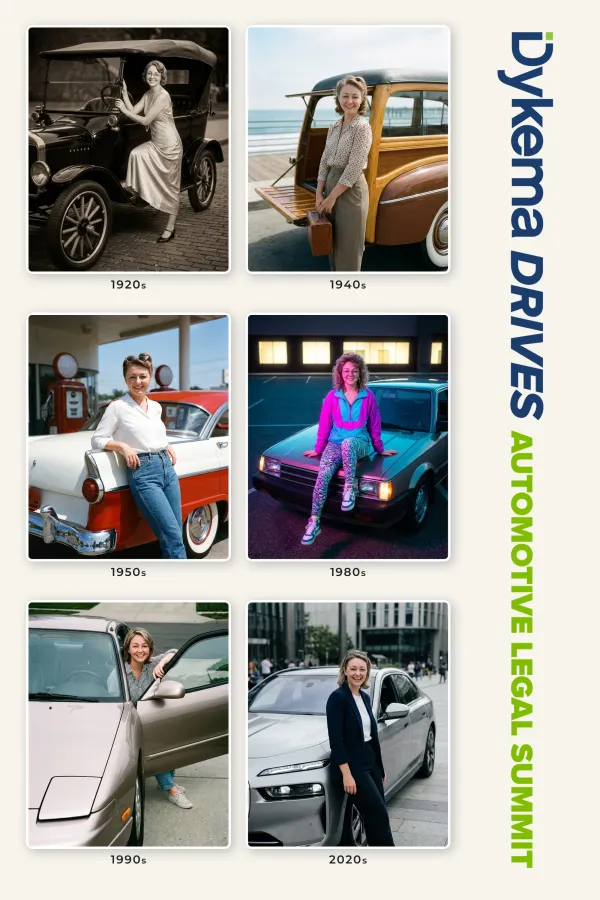
One guest’s sheet from the Automotive Legal Summit. Six decades, one page, in the client’s colours.
Portraits in the styles you write
You write the styles in the portal — a sponsor’s world, a team poster, a film look — and give each one a preview image. On the iPad the guest sees your names, picks one, and takes a photo. The portraits come back to the kiosk with a counter, and the guest prints what they like and gets the set on their phone.
- You write the styles in the portal and add a preview image for each one
- Guests pick a style on the iPad, or you run every style on one photo
- Portraits come back to the kiosk one at a time — “3 of 5 complete”
- Guests print the ones they like and get the set by text or email
- A per-event spend cap you set, so a busy night can’t run away from you
Built for a run of individual portraits rather than group shots: the styles you write are applied to one guest at a time.
A hotel ballroom, or anywhere else
Turn on backdrops in the Photo Booth and guests get a “Choose Your Backdrop” screen instead of a countdown. They tap a scene, the booth cuts them out and drops them into it, and the branded photo is on their phone in seconds. The cut-out happens on the iPad — about six tenths of a second per photo — so it works when the venue Wi-Fi does not.
- Guests tap a scene on the “Choose Your Backdrop” screen — one tap, no confirm step
- The booth cuts the guest out and drops them onto the scene, on the iPad
- Leave one tile as a normal photo, so anyone can skip the whole thing
- Your overlay goes on after the merge, so the frame lands on top of the scene
- Scene artwork is downloaded to the iPad before doors — it runs with no internet
One honest limit: the cut-out takes everybody standing in the frame. A guest walking past behind the subject is composited in with them, so the fix is a drape behind the booth, not a setting.
AI scenes. The same backdrop grid, with the scene generated around the guest instead of composited behind them — tiles say “Up to 3 people,” and if a scene takes longer than 30 seconds the booth hands over the cut-out version rather than making anyone wait. We turn it on per event and sit with you for the first one.
Switched on per event, paid per image
The AI tools are not a plan tier. You add one to an event, run it for that day, and turn it off again — on any plan. Delivered AI images are billed at $0.15 each, once a month, broken out per event, and only images a guest actually received count. A six-decade Time Machine set is six delivered images, so it works out at $0.90 a guest. Set a spend cap on the event and it either warns you or stops generating when you hit it.
- No plan upgrade to run an AI photo op
- Failed generations are not billed — delivered images are
- Six-decade Time Machine set: six images, $0.90 a guest
- A per-event cap, in dollars, that you set before doors
- One bill for the company, itemised by event
Plans, storage and seats are on the pricing page.
The machine learning that isn’t a photo op
Two more tools run models, and neither one generates an image. Face Match finds a guest in the gallery from one selfie, and Magic Search finds a photo from what is in it. Photo Styles, for the record, is not AI — it is exposure, colour and a LUT applied on the device.
Common questions
Which photos leave the iPad, and where do they go?
AI Time Machine and AI Photo Studio send the guest’s photo to Google’s Gemini API to generate the portraits, and the generated images come back to us. Background replacement in the Photo Booth does not: that model runs on the iPad. Face data is never sent to Google — Face Match is our own system. Google is listed on our sub-processors page for exactly this.
Do guests agree to it first?
Yes, and it is on the screen in front of them, not in a policy. The kiosk says “Your photo is used to generate AI portraits and is sent to Google’s Gemini AI to create them. Tapping below is your OK,” and the button they tap reads “I agree — take my photo.” With GDPR Mode on for the event, there is a “No thanks” next to it — nothing is sent, and they can still take a normal photo.
How long does the AI Time Machine take?
The six frames are on screen from the moment the shutter fires and fill in one at a time as they land — the screen counts them, “4 of 6 developed,” then “6 eras, ready.” A batch has a ten-minute ceiling: anything still missing is dropped and the guest is handed what came through, rather than a kiosk that hangs with people waiting behind them.
What does it cost to run?
AI images are usage-priced, not a plan feature: $0.15 per delivered image, billed monthly to the company and broken out per event. Only images a guest actually received are billed — a generation that failed on its way out is not. Count the images each tool delivers: a six-decade Time Machine set is six of them, so $0.90 a guest. You can set a spend cap per event, and choose whether it warns you or stops generating when it is reached.
How many people can be in one AI photo?
The AI Time Machine ships with a two-person cap, and it is checked before anything is generated — a group photo is turned away at the kiosk rather than billed and botched. The booth’s AI scene tiles say “Up to 3 people.” For a group shot, take a normal photo or use background replacement, which composites everyone standing in the frame.
Does any of it work when the venue Wi-Fi dies?
Background replacement does — the model and the scene artwork are both on the iPad, so the booth keeps cutting guests out and the photos queue for upload like any other. The two cloud tools need a connection to generate, because the generating happens at Google.
Can guests tell it is AI?
They are told before the photo is taken, and the tools never pretend a generated image is a photograph of a place the guest stood. The AI Time Machine is a decade portrait; the booth scene is a scene they picked off a grid. Every AI frame lands in the same branded gallery as the real photographs, on the same delivery.
Is everything you call AI actually AI?
No, and we would rather say so. Face Match is a face-recognition model we run ourselves, and Magic Search reads what is in a photo — both machine learning, neither generative. Photo Styles is not AI at all: it is exposure, colour and a LUT, applied on the device. The three tools on this page are the ones that generate an image.
The photo op they talk about
is the one they already have.
BrandStudio is invite-only while we onboard teams one at a time. Tell us about the event and we will set the first AI run up with you.
Request an invite